
Send and receive
Transfers follow Details → Review → Result. The screenshots below use the mobile wallet’s sample session; the desktop and browser wallets use the same sequence.
1. Enter the details
Section titled “1. Enter the details”Select the sending wallet and choose Send. Enter the recipient and amount, choose an asset where offered, and add an optional note.
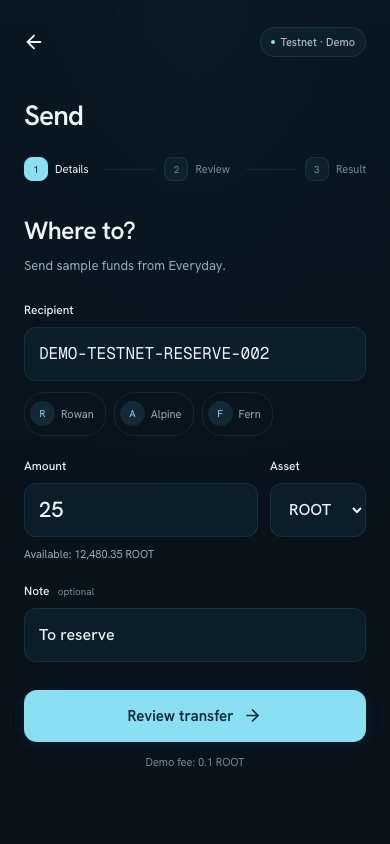
Complete the details, then choose Review transfer. Nothing is submitted at this step.
For several recipients, check each row and the combined amount.
2. Review
Section titled “2. Review”Check the network, source wallet, asset, full destination address, amount, and fee. Return to the previous step if a value needs changing.
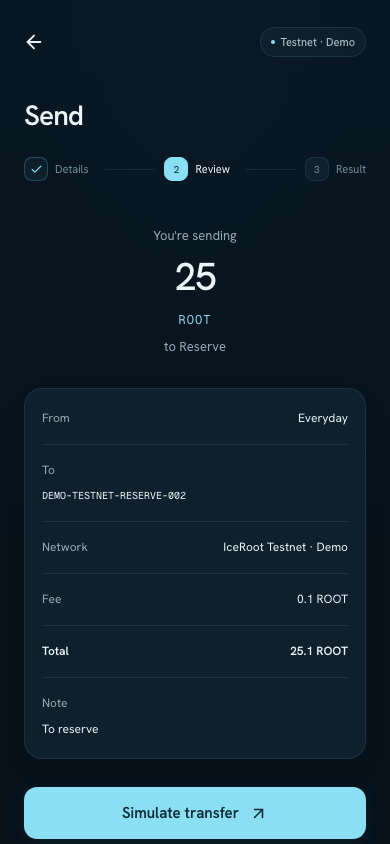
The total includes the fee. In the sample session, Simulate transfer changes only local demo data.
3. Read the result
Section titled “3. Read the result”The final page shows the outcome. Open Activity or the transaction details to inspect the recorded action.
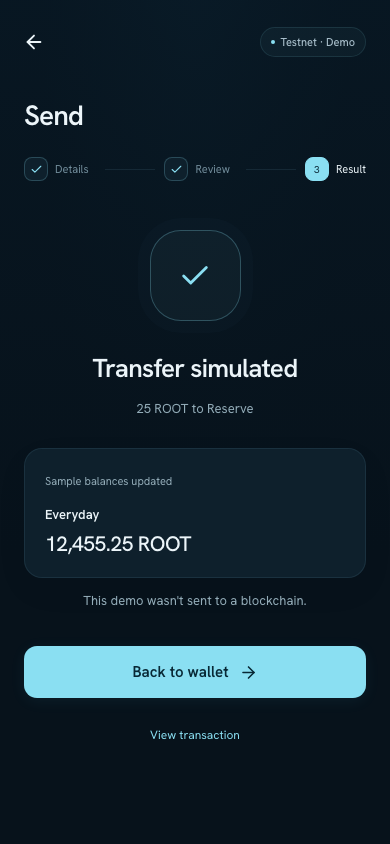
This result explicitly says that no transaction was sent to a blockchain.
A failed or uncertain result needs checking before you retry. Closing a page does not cancel a transaction that was already submitted. Sample balances reset when the demo session is reloaded.
Receive
Section titled “Receive”Select the destination wallet and choose Receive. Check that the account and network match the asset you intend to receive, then copy the address.
A sample address is only for exploring the interface. Use a network-connected wallet’s verified address for an actual transfer.
If you cannot continue
Section titled “If you cannot continue”Check the selected asset’s balance, the amount’s decimal precision, and the balance required for the fee. Correct the details, then review the complete action again.